



















Table of Contents
- • File Viewer Plus Review Summary
- • About File Viewer Plus
- • Other opinions about File Viewer Plus
- • Overview of File Viewer Plus
- • File Viewer Plus Review
- • File Viewer Plus Pricing Review
- • File Viewer Plus pros & cons
- • File Management Features
- • File Viewing and Conversion
- • File Viewer Plus Return Policy
- • File Viewer Plus Digital Delivery Information
- • File Viewer Plus Warranty
- • Contact File Viewer Plus Support
- • Where to buy File Viewer Plus?
- • Conclusion of File Viewer Plus reviews & ratings
File Viewer Plus Review Summary
File Viewer Plus is a versatile Windows software designed to open, edit, and convert over 400 file formats, serving as an all-in-one file management tool. It generally delivers reliable performance and broad compatibility, making it useful for users needing multi-format support without multiple applications. However, occasional format incompatibilities and pricing may affect user experience depending on needs.
Highlights
- Suitable for users seeking a single app for diverse file types
- Supports a wide format range, including documents, images, videos, and archives
- Limited to Windows, with some formats not always opening as claimed
- Reliable overall, scoring 8.3/10 with minor trade-offs
Within the broader category of universal file viewers, File Viewer Plus tends to offer a capable solution but is not a complete substitute for specialized editors. Alternatives exist that may better fit specific use cases. For more detailed insights, see the File Viewer Plus review.
About File Viewer Plus
Handling a wide range of file types can be challenging without the right tools. Users often need to open, edit, and convert documents, images, and multimedia files from different sources. Managing multiple file formats usually requires installing several applications, which can complicate workflows and increase expenses.
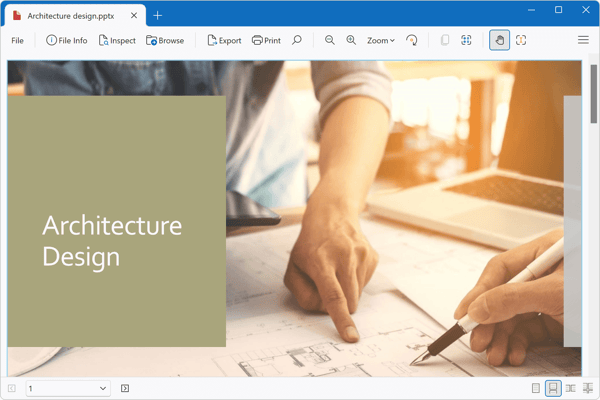
File Viewer Plus is a Windows software designed to bridge this gap by supporting over 400 file formats. It allows users to view, edit, and convert files across various categories, including documents, images, videos, and archives. Positioned as an all-in-one file utility, it reduces the need for multiple specialized programs in software environments.
The software has gained traction through positive user feedback and consistent updates. Its batch conversion feature and offline capabilities have been noted as valuable by professionals and casual users alike. While it is respected within its niche, it remains a Windows-only solution, limiting its audience to users on that platform.
The primary purpose of this tool is to simplify file interaction for users who work with diverse formats. However, its subscription pricing and occasional format incompatibilities may be drawbacks for some. Potential users can explore detailed assessments in the File Viewer Plus review to evaluate if it suits their needs effectively.
Other opinions about File Viewer Plus
Opinions and insights gathered from trusted review articles and authoritative websites covering File Viewer Plus.
Overview of File Viewer Plus
File Viewer Plus is a software application developed by Sharpened Productions, Inc., based in Minneapolis, Minnesota. It serves as a universal file viewer for Windows, capable of opening over 400 file formats across documents, images, videos, archives, and more. The software was first released in 2023 and has continued to receive updates, including its latest version 6.2.2.
Within the software ecosystem, File Viewer Plus functions as a multi-purpose tool designed to reduce the need for multiple specialized programs by providing viewing, editing, and converting capabilities. It supports a wide range of file types such as Microsoft Office documents, PDFs, CAD drawings, audio and video files, and raw image formats. The program also features an integrated file manager that allows users to organize files locally.
Development of File Viewer Plus emphasizes compatibility and operational efficiency, including batch file processing and proprietary file identification technology for unknown formats. It operates solely on Windows platforms, with updates delivered through both one-time purchases and subscription models. Users can access trial versions before committing to a purchase as indicated in the File Viewer Plus Review documentation.
File Viewer Plus Review
File Viewer Plus is a software brand focused on providing versatile file management solutions for Windows users. It specializes in handling a wide range of file types, allowing users to view, edit, and convert various formats through a single application. The brand aims to simplify workflows by reducing the need for multiple specialized programs.
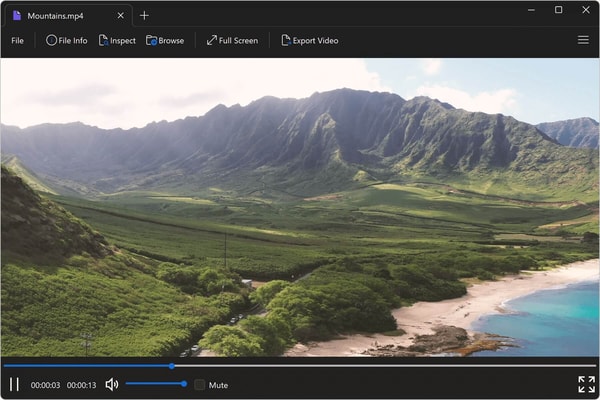
The brand's products support over 400 file formats, including documents, images, videos, and archives. They offer batch processing capabilities, content-based file identification, and editing functions to enhance user productivity. Positioned as an all-in-one tool, File Viewer Plus is tailored for users seeking comprehensive file access and management on Windows platforms.
File Viewer Plus Highlights- Wide format compatibility
- Editing and conversion features
- Batch file processing
- Local offline operation
- Content-based file identification
File Viewer Plus Pricing Review
File Viewer Plus is a Windows application that supports opening, editing, and converting over 400 file formats, including documents, images, audio, video, CAD files, and archives. It provides a versatile solution for managing a wide range of file types without needing multiple programs.
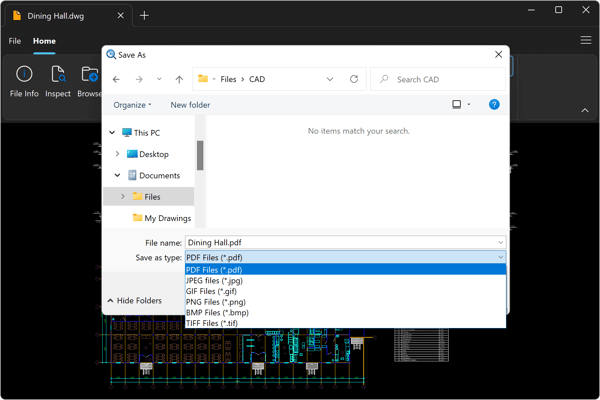
The software includes advanced features such as batch conversion of thousands of files and a proprietary file identification algorithm, making it suitable for users who require more than just simple file viewing. Its interface is designed to streamline diverse file management tasks efficiently.
File Viewer Plus is available as a one-time purchase priced at 23.29 USD or an annual subscription at 11.67 USD. Both options include updates and support, with the one-time license covering all version 6.x updates and offering free support for two years.
Price $23.29 • fileviewerplus.com
File Viewer Plus pros & cons
File Viewer Plus supports over 400 file formats and offers practical features such as file editing, conversion, and batch processing. It includes useful tools for identifying unknown files and managing files through renaming, moving, and deleting, all within an intuitive, user-friendly interface that runs offline.
The software is limited to Windows, which restricts its availability to users on other platforms. Some users report occasional compatibility issues with certain file types, and the pricing, particularly the subscription model, may be considered expensive for some customers.
- • Supports over 400 file formats
- • Editing and conversion capabilities
- • Batch processing for thousands of files
- • Identifies unknown file types by content
- • User-friendly interface
- • Offline functionality
- • File management features
- • Windows only
- • Occasional compatibility issues
- • Higher price with subscription model
File Management Features
File Viewer Plus includes a built-in file manager that allows users to organize files and folders by renaming, moving, copying, and deleting directly within the application. It provides detailed thumbnails and preview panes to facilitate efficient navigation and content scanning. The file manager also supports quick access to favorite locations and offers advanced sorting options.
The file manager displays thumbnails for Office documents that are not supported by Windows Explorer by default, enhancing productivity. Key features include standard file operations, detailed thumbnails for various file types, split-view mode for file previewing, and bookmarking of favorite folders. This integrated file management reduces the need to switch between multiple applications during file handling tasks.
File Viewing and Conversion
File Viewer Plus supports a wide range of file types including text documents, spreadsheets, presentations, images, audio, video, archives, CAD files, and source code with syntax highlighting. It can identify over 10,000 file formats, including files without extensions, allowing users to confidently manage unknown files. The software provides editing tools such as a word processor for documents and image editing for supported formats. Conversion features include batch processing and the ability to convert PDFs to editable Word and PowerPoint documents.
Core capabilities: conversion between multiple document and image formats, batch conversion for bulk processing, support for camera raw and medical DICOM images, and playback of over 150 audio and video file types. These features make File Viewer Plus a versatile utility suitable for users with diverse and complex file handling requirements.
File Viewer Plus Return Policy
File Viewer Plus offers a 30-day money-back guarantee on purchases made through official channels. There are no stated fees for returns requested within this guarantee period. This policy ensures customers can request a refund if needed within the specified timeframe.
The guarantee does not apply if the software has been misused or if the request is made outside the 30-day refund window. Customers should ensure their purchase complies with these conditions to be eligible for a refund. Returns outside these criteria will not be accepted under the policy.
File Viewer Plus Digital Delivery Information
Software license keys are delivered digitally via email or can be accessed through the user's account on the official website, with availability worldwide. This method ensures that the software is accessible regardless of geographic location.
Access to the software is granted instantly upon purchase. Installation and operation require a Windows 10 or higher operating system, and no physical shipment or tracking is involved in the delivery process.
File Viewer Plus Warranty
Coverage: Free support is included for two years with a one-time purchase license, while subscription plans provide ongoing support and updates. Software updates and bug fixes are regularly released to maintain compatibility and performance. Warranty support focuses on functional assistance for the software.
Limitations: The warranty does not cover issues caused by unsupported operating systems, misuse, or installation problems. It also excludes guarantees related to content recovery or data integrity. Users should be aware that warranty support is limited to software functionality only.
Contact File Viewer Plus Support
Users can contact Sharpened Productions, Inc. for support or sales inquiries through various methods provided on the official website. Assistance is available via email and a knowledge base for troubleshooting common issues.
- Contact form available on the official website
- Email support through the website contact form
- Knowledge base for self-service troubleshooting
Registered users have access to premium support channels as part of their license agreement. All communications respect privacy and comply with applicable regulations.
Where to buy File Viewer Plus?
File Viewer Plus is officially available for purchase through its website, where users benefit from a structured account system, access to dedicated support, and clear policies regarding licensing and refunds, which adds reliability to the purchase process; although some may find variations in terms when exploring third-party marketplaces, the official channel ensures consistent service and product updates, with expectations set for both one-time and subscription plans; users should be aware that marketplace experiences can differ and may not always match the clarity or support found at fileviewerplus.com.
Conclusion of File Viewer Plus reviews & ratings
File Viewer Plus holds a significant place in file management tools by supporting over 400 file formats and offering features like editing and batch conversion. Its ease of use and offline functionality make it a practical choice for users seeking a single solution.
Exploring the application's full capabilities can provide useful insights, and you can always revisit the File Viewer Plus review for a balanced perspective. This approach helps maintain an informed view without relying on aggressive promotion.
Editorial notes reflect aggregated buyer feedback and our independent editorial review of publicly available information. They are for informational purposes only and do not constitute endorsements. Purchases are made at your own discretion, and we are not responsible for transactions or outcomes related to this store. Experiences may vary. This content is assisted by AI and reviewed by our editorial team. While we strive for accuracy, AI-supported information may not always be 100% precise, so please verify any critical details.

